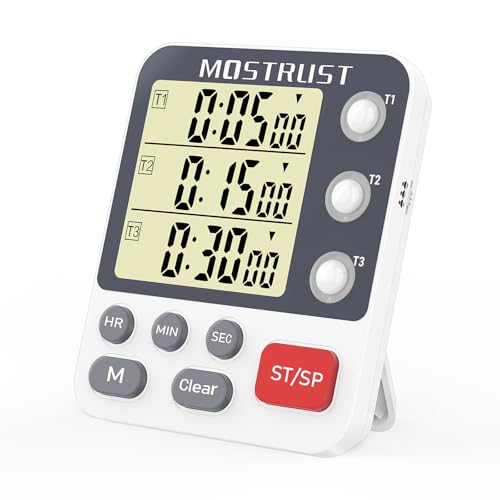
The MOSTRUST Digital Dual Kitchen Timer lets you track three separate cooking tasks at once, making it ideal for home cooks juggling multiple dishes on the stovetop or oven. Its large display and simple button layout work well for anyone who needs clarity and ease of use, while adjustable alarm settings—from loud to silent with visual alerts—suit different kitchen environments. The magnetic back and stand provide flexible placement options, whether on your fridge or countertop.
As an Amazon Associate we earn from qualifying purchases. You'll be redirected to Amazon to complete your purchase.
【3 Channels Countdown Timer with Stopwatch】--- 3 events can be counted down simultaneously. It can also act as a stopwatch and time up to 99 Hours, 59 minutes and 59 Seconds. Perfect timer for cooking, barbecue, baking, exercise, gym workout, sports, homework, games, kids’ activities and meetings
【Large Display & Simple Operation】--- The triple cooking timer with screen protector and high contrast large display provides a clearer bold numbers, which make it easier to read. Meanwhile Press "CLEAR" to set to ZERO, and then start timing! Simple and easy button design, kids also can use it without thinking
【Adjustable Volume & Flash Light】--- Easy to adjust alarm volume by Switching (HIGH/ LOW/ MUTE) basing on your requirement. Loud Alarm Sound+Red Light Flashing Mode to ensure that nothing will be forgotten; Mute+Red Light Flashing Mode to ensure that it will not disturb others
【Multiple Placement Options】--- The 3 groups kitchen timer has strong magnetic back, retractable stand and hanging hole, it is convenient to place in three ways especially its 3 STRONG MAGNET working fine on the refrigerator
【AAA Battery Timer with Eco Mode】--- The 3 independent countdown timer is powered by 2 * AAA batteries included. Press and hold CLEAR button into screen-off standby to save battery
【Memory Function】--- Our digital kitchen timer will restore the last countdown time after timing completed. You can also long press the "M" button to set a re-use time you need as a memory time, then just press the "M" button will bring up memory time automatically